
QML for an operator screen: the conventions we follow
These are the conventions we follow when we build an operator screen in Qt 6 and QML. The first sections are about code that a colleague can read and change without effort. Further down are the things you don’t notice on a laptop but do notice on the device: memory, threads and the work the GPU has to do.
You won’t need all of it right away. For a first screen, the first sections are enough. A screen that has to last for years and is changed by several people needs the rest as well. The list grew out of what we ran into on machines, supplemented with what Qt itself documents about bindings, modules, models and the scene graph.
A file you can read
We put one type in each file, and the file is named after that type in PascalCase: AlarmRow.qml contains AlarmRow. A view, a reusable row and a helper function go into separate files, even while they are still small together.
The root item always gets id: root, and bindings in the file refer to that id instead of to parent. If someone later wraps the component in an extra item, parent changes, but root still points to the right thing. An id is also only visible inside its own file. If another file wants to set label.text, that usually means the type is missing a property.
We write properties and functions in camelCase, with a name that says what they hold or do, such as alarmCount and acknowledge(). Names like x1 or rect2 force the next reader to go through the whole file before they know what they are changing.
The order inside a file is fixed, so you don’t have to hunt for things during a review: first id, then properties, signals, functions, the children, and states and transitions at the bottom. At the top there is a single line of comment about what the type does. Beyond that, we only add comments to a binding that is hard to follow without an explanation.
A container that draws nothing itself is an Item. A transparent Rectangle used as a holder for children adds an extra node that contributes nothing.
import QtQuickItem { id: root property string title: "" property int alarmCount: 0 implicitWidth: label.implicitWidth implicitHeight: label.implicitHeight Text { id: label text: qsTr("%1 actief").arg(root.alarmCount) }}Use a default value for something the caller is allowed to leave out. If someone forgets alarmCount, it silently stays at zero here. If the caller always has to pass the value, make it a required property. We come back to that when we get to reusing components.
Bindings
A binding is an expression that is re-evaluated every time something it depends on changes:
text: root.titleThat keeps the text tied to the data. An assignment in a handler breaks that link and puts a single fixed value in its place:
onClicked: label.text = qsTr("Bezig")After that click, label.text no longer follows the status, and later status changes never show up on screen. In a demo nobody clicks the same button twice. On the machine it happens all the time.
Handlers are for side effects: playing a sound, logging a line or calling root.acknowledge(). The same goes for onTitleChanged. You can do something there because the title changed, but you shouldn’t copy the new title into a second property. A copy like that is a binding you rebuild by hand, and sooner or later it falls behind.
If a binding has to step aside for a while and come back afterwards, use the Binding element with a when condition.
Keep bindings cheap as well. They are re-evaluated on every change, and animations and layouts cause more changes than you would expect. A loop over a list, a date you format by creating objects every time, or a call into C++ that does real work should be computed ahead of time, so the binding only displays the result. A pure function from a .js file is fine, as long as it only works with its arguments:
import "format.js" as Formattext: Format.duration(root.seconds)Be careful with property var. If you push onto an array or change a field of a JavaScript object, the binding isn’t notified and keeps showing the old value. Numbers, strings, booleans and real models do report their changes.
Text, layout and touch
Every piece of text the operator gets to see goes through qsTr(). If you glue words together with +, you lock in the word order of the source language. With %1 and .arg() the translator can change the order, and plurals are handled with %n. The second argument of qsTr() is the context, for words that have one meaning in the source language and two in another.
To see which strings are still untranslated, run lupdate and test with a language you deliberately leave incomplete. Temporarily putting strings in the source code in capitals to mark them is risky: whatever doesn’t end up in the .ts file ends up in the product that way.
A German label is often longer than the English word in the design. RowLayout and ColumnLayout absorb that. Use anchors for fixed geometry, such as a page that fills the whole screen or a line that has to sit against an edge. anchors.fill: parent on a page that runs fullscreen is a good example. Don’t combine anchors with a fixed width on the same item, because then two things determine the width at the same time.
Buttons need to be big enough. You can’t reliably hit a button 28 pixels high with a glove on or in a moving cab. The layout has to accommodate that height, even when the text turns out longer than in the design.
On a panel with a fixed resolution we use font.pixelSize. pointSize depends on the DPI the system reports, and on an embedded panel that often doesn’t match what the design assumed. Stick to one font family and a limited number of sizes. Drawing text costs more than drawing a rectangle, especially the first time a particular font size has to be rasterized.
Components you reuse
As soon as a second screen wants to use parts of the first, structure starts to matter more.
The screen belongs in a QML module, with a URI and a version, created with qt_add_qml_module. In Qt 6 you write import QtQuick without a version number. What other modules are allowed to use is the public side of the module. The rest stays internal.
Inside the module we keep a fixed folder layout: views/ for screens, components/ for reusable parts and models/ for models written in QML. The folders don’t enforce anything themselves (the module does that), but they help the reader find their way around.
Since Qt 6.5 we put pragma ComponentBehavior: Bound at the top. Without that pragma, QML keeps looking further outward for an unknown name, all the way up to main.qml. If there is an Item with id: theme in there, theme.font works everywhere. That goes fine until someone adds their own theme property or splits up the main screen, and half of the text suddenly has the wrong font. With the pragma you refer explicitly to root. or to a singleton.
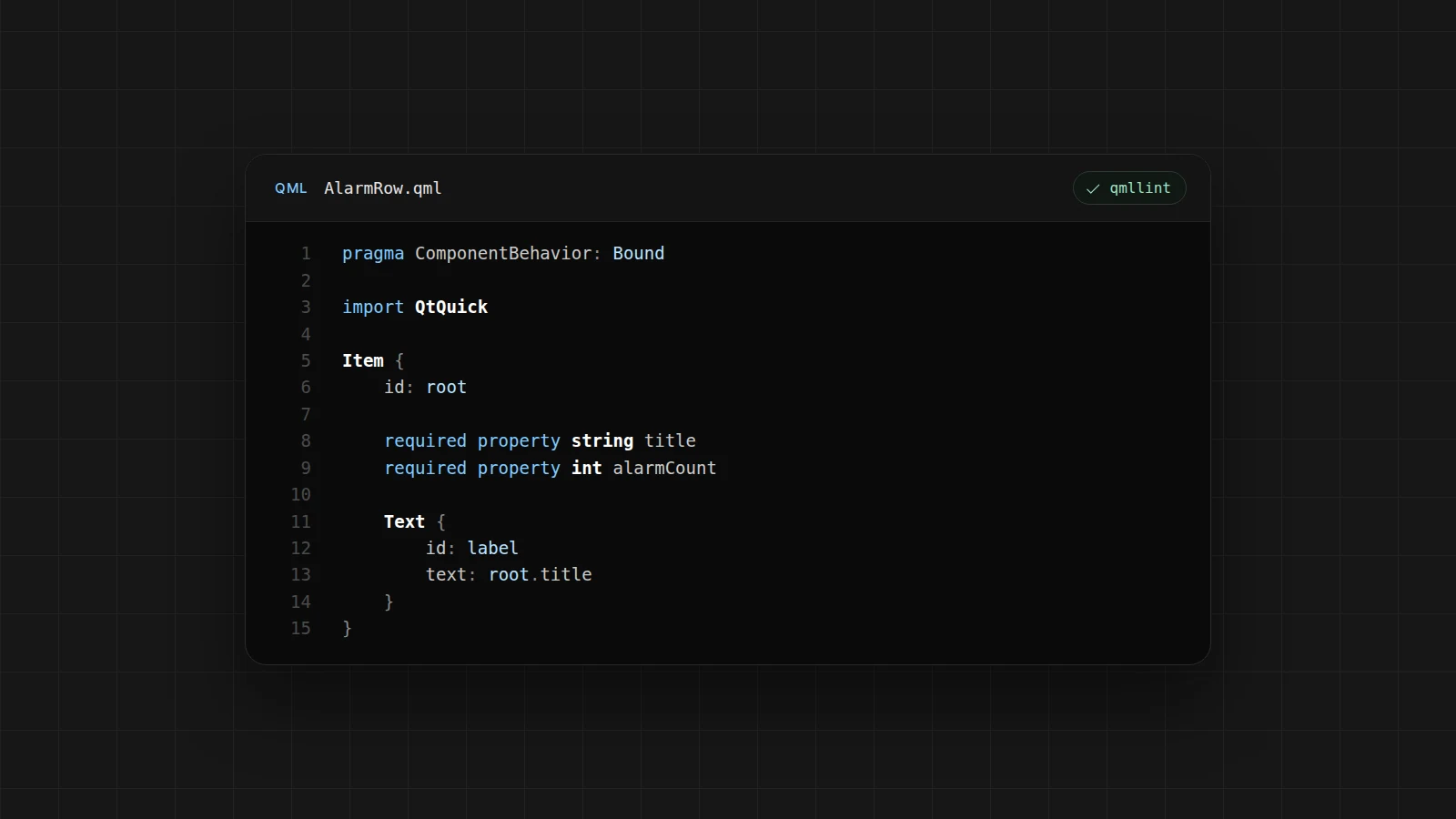
With required property you make it clear what a component needs. If the caller forgets alarmCount, loading fails straight away, instead of the value silently staying at zero. In AlarmRow.qml that looks like this:
pragma ComponentBehavior: Boundimport QtQuickItem { id: root required property string title required property int alarmCount enum Severity { Info, Warning, Fault } property int severity: AlarmRow.Info signal acknowledge() QtObject { id: d property bool pressed: false }}An enum gives a state a name. With severity: 2 the reader has to go and look up elsewhere what 2 means. You refer to the value as AlarmRow.Info, because the file name is also the name of the type.
Internal state that is nobody’s business outside this file goes into a QtObject with its own id. That way d.pressed is only visible inside this file.
Be careful with a property alias to a button or a color inside the component. It turns an implementation detail into part of the API. It is better to give the type its own property and bind that inward. An alias does make sense when the inner object is deliberately the API, for example a TextField that you expose as a whole.
We keep colors, fonts and margins in a singleton. QML has no stylesheets, and an item in main.qml that serves as the theme only works because of the lookup we just switched off. The file gets pragma Singleton, and in CMake you set QT_QML_SINGLETON_TYPE TRUE on that file. Otherwise the module doesn’t register it as a singleton.
pragma Singletonimport QtQuickQtObject { readonly property color alarm: "#c0392b" readonly property int margin: 16}A color that only appears on one button can stay on that button until a second screen needs it too. The same applies to components: a pattern you copy for the second time becomes its own component. The first time is usually still too early.
Lists and models
A Repeater creates all rows at once. For a log of fifty lines that is fine. An alarm history of a few thousand lines belongs in a ListView, which only creates the visible rows and the cacheBuffer. If the rows are heavy, set reuseItems: true so the view recycles existing rows instead of creating new ones.
A delegate declares the roles it needs, including index, as required property. Without those declarations the row relies on the context properties the view automatically puts around it, such as model. That only works inside that one view, and with the ComponentBehavior: Bound pragma such unqualified names are no longer allowed.
ListView { id: root model: alarmModel reuseItems: true delegate: AlarmDelegate { required property string message required property int severity required property int index width: ListView.view.width }}ListView.view refers to the view the row sits in. That way the width keeps working if you later move the delegate into a separate file.
The row binds to its required properties. A property var that you fill in during Component.onCompleted only shows the value from the moment the row was created, and misses whatever the model changes afterwards.
We use ListModel and ListElement for fixed sample data during design. You can’t call qsTr() inside a ListElement. Mark the text there with QT_TR_NOOP() and translate it in the delegate with qsTr(). If the data comes from the machine, it belongs in a QAbstractListModel in C++, with named roles, dataChanged for a single row and a reset when the whole list is replaced.
If you use a JavaScript array as a model, replace it with a new array. A push onto the existing array doesn’t reliably refresh the screen, for the same reason as with property var.
Also don’t modify the model from a delegate while the view is drawing. That causes flickering and rows that jump around. An acknowledgement goes to C++, which updates the model, and the view follows on its own.
State, signals and animation
If a screen looks different when the machine is running, give it a state. With when: root.running you tie that state to the data. PropertyChanges can, for example, change color while the state is active, and restore the value afterwards. An onRunningChanged that assigns the color itself is once again the loose assignment from the section on bindings.
Put onClicked on the button itself. Use Connections for signals from another object, or from an object that can be swapped out. A connection you make in JavaScript with someObject.clicked.connect(...) stays in place until you disconnect it yourself, even if the screen that created it is long gone.
For animations on x, opacity or scale we use Behavior and Transition. Those run in step with the rendering of the screen. A Timer that changes a coordinate every 16 ms doesn’t, and it stutters as soon as the GUI thread has other work to do. If you want an animation to stay smooth while the GUI thread is briefly busy, use the Animator types such as OpacityAnimator and XAnimator. They run on the render thread. If the operator taps during a transition, it is interrupted and the screen ends up in whatever state applies at that moment.
We leave out animations that don’t clarify anything. On an operator screen they mostly slow down someone who wants to acknowledge an alarm quickly.
We don’t let business logic grow inside the screen. Calculating a recipe, tracking an axis or maintaining an alarm list happens in C++, and the screen binds to the result. A small helper that converts seconds to a clock time can live in a .js file next to the component. State that the screen has to follow doesn’t belong there in a variable inside a closure.
The boundary with C++
The state of an axis, a recipe or an alarm list lives in a QObject on the GUI thread. The screen displays that state and sends commands back.
Every value QML has to follow is a Q_PROPERTY with a NOTIFY signal. Without that signal, the binding is evaluated once at load time and never again. A property that never changes is marked CONSTANT.
A command is a slot or a Q_INVOKABLE, for example acknowledge(int id). C++ then updates the property, and the binding updates the screen.
Everything that crosses the boundary has a clear type. An id is an int or a string, a status is a Q_ENUM with the same names on both sides, and a list that grows is a model. We save QVariant, QVariantMap and var for the edges where the type is genuinely unknown. In a regular API they accept anything, and after a while nobody knows what is in them.
An object that C++ hands to QML needs a clear owner. If it belongs to the machine, C++ keeps hold of it. If a Q_INVOKABLE returns an object without a parent, JavaScript takes ownership, and the garbage collector can clean it up while C++ still has a pointer to it. So make the ownership explicit with QQmlEngine::setObjectOwnership, or give the object a parent.
A QObject used by the QML engine should only be accessed from the GUI thread. A worker thread that sets a property or emits a signal directly causes crashes you only see now and then. Let the work happen in the worker and send the result back through a queued connection or QMetaObject::invokeMethod. The object on the GUI thread then sets the property.
Component.onCompleted is called as soon as the object is in the tree. If you fetch state there once and never look at it again, you get the same problem as with an assignment in a handler: the first value is correct, the ones after it aren’t.
What stays in memory
QML cleans up an object when its parent goes away or when you call destroy(). As long as an object has a parent, it stays alive.
visible: false takes an object off the screen, but its bindings keep running and its memory stays allocated. A SwipeView or StackLayout with three pages as children creates all of those pages at startup. A page that isn’t open yet goes into a Loader with active: false. That only creates the page when the operator opens it, and can tear it down again afterwards.
Loader { active: root.page === "alarms" sourceComponent: AlarmPage { model: root.alarmModel }}A StackView keeps track of what is on the stack. On a pop, the top item is destroyed if the StackView created it itself, from a component or a URL. Whatever you pushed and haven’t popped yet still exists, along with the models and timers of that screen. So give a timer running: root.visible, or a parent that goes away with the screen. Otherwise it keeps firing on a screen the operator left a long time ago.
createObject(root, { ... }) hooks the new object into the tree. Without a parent nobody cleans it up, unless you call destroy() yourself. Popups are the classic place for this kind of leak, because they only cause problems once the screen has been open for days.
A JavaScript closure that holds on to an entire screen also keeps that screen alive after the view has let go of it. You won’t see it in the object tree. You will see it in a memory measurement, as a page you popped that keeps growing anyway.
We remove any Item that only serves as a wrapper and adds nothing. Every visual item is a node in the scene graph. The depth of the nesting is rarely the real problem, but it pays to keep it limited.
What the GPU does
The scene graph merges nodes into batches, so the GPU doesn’t have to draw every Rectangle separately. Anything that breaks a batch costs an extra draw call. On an i.MX or STM32MP that adds up faster than on the laptop the screen was designed on.
clip: true on a single viewport is normal. If you put it on every cell of a list, each row breaks the batching.
opacity below 1 on an item with children is applied to each child separately. Overlapping children then show through each other. If you want a group to fade out as a whole, you need layer.enabled, which first renders the group to a separate texture. For a row that only needs to be a bit lighter, it is better to give the Rectangle itself a color with alpha.
layer.enabled, shadows, blur and masks all need such a separate texture. One shadow behind a dialog goes unnoticed. The same shadow on every alarm row does not.
An image is decoded at the size of the file. A 2000-pixel PNG that you display at 48 pixels takes up the memory of 2000 pixels. With sourceSize you have it decoded at the size you draw it.
Image { width: 48 height: 48 source: "qrc:/icons/valve.png" sourceSize.width: width sourceSize.height: height}Small icons can share an atlas. A photo used as the background of a button, on the other hand, stays a full photo in memory.
Anchors, by the way, are not automatically faster than layouts, even though you often read that they are. Measure it instead. The QML profiler in Qt Creator and the scene graph render counters show whether a jerky list is caused by the delegate, a binding or a shadow. We only optimize what the measurement points to.
In the build
qmlformat takes care of consistent formatting, so indentation is no longer a topic in reviews. qmllint finds unused imports, unknown properties, binding loops it can detect statically, and unqualified names when the pragma is on. In our projects both run as part of the build, and a qmllint error fails the build. Warnings that don’t block anything tend to get ignored quickly.
We only use console.log on the development machine. On an image it ends up in the journal, or as text an operator should never have seen. Go through Qt’s own warnings, such as binding loops, deprecated properties or “creating a lot of items”, thoroughly once on a release build. After that, the screen should start up silently.
We test components with Qt Quick Test. A TestCase sets a property and waits for the result with tryCompare. A fixed wait happens to be long enough on the laptop, and not on the device. With SignalSpy you check that a command goes out when the operator taps acknowledge, without starting the whole application. We use Squish or a similar tool for the flow between screens, such as an operator walking through the application. That comes on top of the component tests and doesn’t replace them.
Many of these conventions you can uphold in a review, such as the structure of a file and the way bindings are used. The rest, from modules and models to a build that stops on qmllint, makes sure it stays that way as the codebase grows.