
.NET on embedded Linux: why C# can be a strong choice
When people think of embedded software, they usually think of C or C++. Once a product runs Linux on an application processor, though, the software context looks very different. With process isolation, virtual memory, networking, systemd and a full operating system, you can also run a managed runtime such as .NET in a robust way. We like doing that, and in this article we explain why, and what to watch out for.
Embedded Linux does not have to mean C or C++
On microcontrollers, C and C++ are still the obvious choice. An embedded Linux platform with, say, a Cortex-A53/A55, an x86 processor or a comparable application processor is in a different class. There is usually enough memory and processing power there to use a managed runtime.
Native code remains very valuable for drivers, existing stacks, performance-critical code and specific hardware integration. It just does not have to dictate the language of the entire application. That also means not every application developer needs to be a low-level C/C++ specialist.
Modern .NET really is cross-platform
The old picture of .NET as a Windows technology stopped being accurate a long time ago. Modern .NET runs natively on Linux and supports the architectures that matter, such as x64 and Arm64. An application can run as a Linux service, integrates with systemd and is published specifically for the target.
Embedded Linux | systemd | .NET runtime |C# applicationThe ecosystem is a big advantage
The strongest argument for .NET is the whole ecosystem around C#, more than the language itself. Much of what keeps coming back in industrial applications is well supported, and a large pool of developers already knows it:
- Networking: HTTP, REST, WebSockets, TLS and mature MQTT libraries.
- Data: JSON, XML, SQLite, databases and serialization.
- Concurrency: Tasks, async/await and channels.
- Logging: ILogger and structured logging.
- Software architecture: dependency injection, configuration and hosted services.
- Testing: mature tooling for unit and integration tests.
- Cloud integration: a natural fit with ASP.NET Core and cloud services.
Productivity matters
In many embedded Linux products, the complexity is not in the registers. It is in the business logic, communication, data storage, synchronization, error handling and user interface. Garbage collection, async/await, LINQ, NuGet and the strong tooling around C# can speed up development considerably in that situation.
For embedded applications with a lot of business logic, C# lets developers spend more time on the product and less on infrastructure.
It is also easier to find developers. An edge application does not need to be written by someone who is also an expert in C++, memory ownership, CMake and cross-compilation.
Where .NET fits best: industrial edge applications
We find .NET most interesting when Linux forms the boundary between the low-level hardware and the product application. Think of data loggers, gateways, connected machines, edge computers, local APIs, machine HMIs and systems that collect data and sync it to the cloud.
Sensors / CAN / PLC / peripherals | Embedded Linux | .NET application / \ Local UI CloudYou can still reach the hardware
A C# application does not have to drive the hardware directly through registers. Linux abstracts many interfaces through standardized subsystems and device interfaces. You access serial communication, GPIO, I2C, SPI and CAN from userspace, depending on the platform and the available libraries.
CAN controller |Linux SocketCAN |.NET applicationNative code where it is needed
Not everything has to be managed code. Through native interoperability, including P/Invoke, C# can call existing C or C++ libraries. That way you keep proven protocol stacks, hardware libraries or performance-critical components.
C# application |native interop / P/Invoke |C / C++ library |hardware / protocol / acceleratorUse native code where it makes sense, rather than everywhere out of habit.
Avalonia makes .NET interesting for HMIs too
Embedded .NET does not have to be headless. With Avalonia you can build modern graphical interfaces in C# that also run on Linux. For some industrial HMIs, that is an interesting alternative alongside Qt/QML.
Avalonia UI-------------------------C# application logic-------------------------.NET-------------------------Embedded Linux-------------------------ARM / x86 hardwareQt remains particularly strong for deep embedded integration, C++-based products and mature embedded graphics applications. How licensing works there is explained in Qt licensing for embedded devices. Avalonia with .NET becomes interesting when your team already has a lot of C# experience, the application contains a lot of business logic, or you use the same technology for backend and tooling.
Avalonia on embedded hardware: smooth once running, slower to start
Our experience with Avalonia on sufficiently powerful embedded Linux hardware is positive. Once the application is running, the interface feels very smooth. Animations and interaction are on par with what users expect from a modern HMI.
You mainly notice the difference with a lean native application at startup. The .NET runtime and the UI stack have to be initialized before the first full UI appears, and on an embedded ARM platform that startup time is more noticeable.
Once Avalonia is running, it can be very fast on embedded hardware. Startup time does need attention.
You can account for that in the product design. Start the UI early through systemd, defer non-critical initialization until after the first frame, start backend services in parallel and show a boot splash if needed. Native AOT can be interesting for some configurations, but you have to validate it concretely together with Avalonia and all the dependencies you use.
One ecosystem from device to cloud
There is an organizational benefit when you use C# in the backend as well as on the device. Your team then shares knowledge, models and tooling across the different layers of the product.
DEVICE: C# / .NET / Avalonia |MQTT / HTTPS |CLOUD: ASP.NET Core |API / database / servicesHow do you get .NET into a Yocto product?
There are several ways to deploy. Which one fits best depends on how many .NET applications run on the device, how you manage OS and application updates, and how much control you want over the runtime version.
Option 1: the .NET runtime in the Yocto image
You build and manage the .NET runtime and the required native dependencies as part of the root filesystem. The application then uses the runtime the platform provides.
Yocto image├─ Linux / systemd├─ .NET runtime├─ native dependencies└─ applicationThis is attractive when several services share the same runtime, or when you deliberately manage the runtime and applications as a single platform stack. The Yocto layers and recipes and the chosen .NET version then become part of your BSP and image management.
Option 2: self-contained deployment
You can also publish the application for the target with the required .NET runtime components bundled. The Yocto base image then does not need to provide a .NET runtime as a platform package.
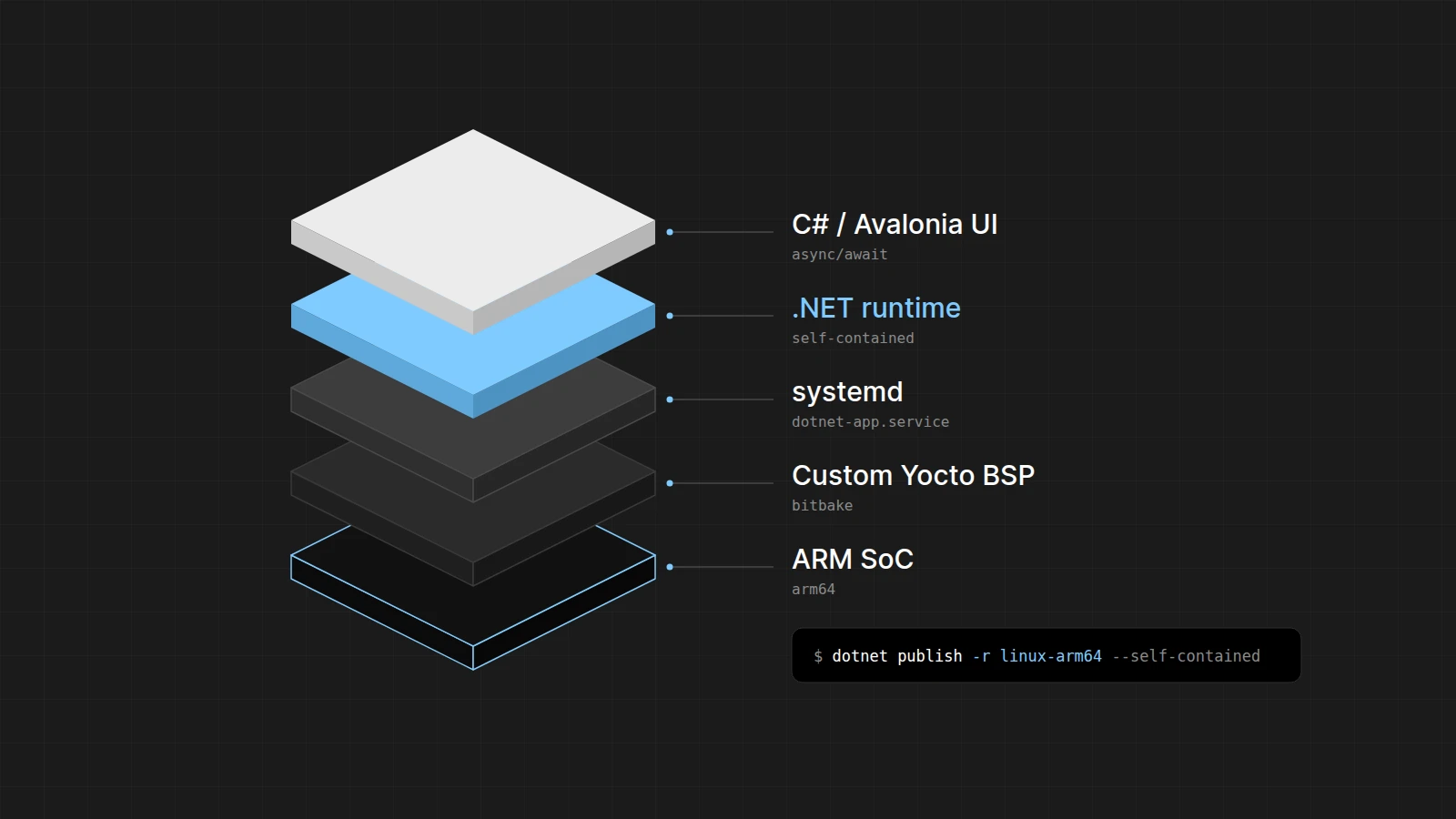
Yocto image├─ Linux / systemd└─ application/ ├─ executable ├─ .NET runtime components └─ managed / native dependenciesdotnet publish -c Release -r linux-arm64 --self-contained trueFor embedded Linux this is often an attractive split of responsibilities. Yocto is responsible for the operating system and the BSP, and the application brings along the .NET runtime version it was built and tested with. That way you manage and test the application stack more independently of the root filesystem.
Self-contained does not necessarily mean a single static file, by the way, and it does not make every native system dependency disappear. The target architecture, the libc and any native libraries are still part of the compatibility analysis.
Option 3: Native AOT
Native AOT compiles .NET code ahead of time into native code. That can bring benefits for startup time and, in some scenarios, for footprint. It does not solve everything, though. Reflection, dynamic code generation and libraries that rely on runtime features can mean extra work or limitations. For a concrete embedded stack you should validate AOT rather than assume it works.
Yocto and .NET: control and productivity
A custom Yocto Linux image and a high-level application stack go together well. Yocto gives you control over the BSP, the kernel, the drivers, the packages and reproducibility. On top of that, .NET raises the productivity of application development. Why we often end up choosing Yocto for such a product is explained in Yocto vs Ubuntu vs Debian.
Application / Avalonia.NET runtime or self-contained app-------------------------systemd / Linux services-------------------------Custom Yocto BSP-------------------------ARM SoCEven on a heavily customized embedded Linux platform, the application stack can be high-level.
What about performance?
C and C++ remain the right choice when maximum control over memory, very low latency or specific native libraries are central. For a Linux device with enough RAM, the real question is often whether the difference with C++ actually matters for your application.
An application that processes CAN data, encodes JSON, sends MQTT messages, manages a database and displays an HMI is usually limited by I/O and application logic, and much less by raw CPU performance.
Garbage collection: the important caveat
Managed memory comes at a cost. Garbage collection can introduce latency, so .NET is not automatically suitable for hard real-time control loops. For ordinary edge, HMI and data processing applications this matters much less.
Real-time MCU |CAN / UART / Ethernet |Embedded Linux |.NET application |UI / Cloud / StorageWe make that same split in our own X Series. The simple, deterministic power and ignition logic runs on a microcontroller, and the application processor runs the much richer Linux application layer.
Updates and lifecycle
.NET applications also need maintenance after deployment. Depending on the architecture, you update an application separately, as a container or together with the full Linux image. Authenticity, rollback, versioning and controlled rollouts remain important.
With Otaryx we build around that broader embedded lifecycle: software and image updates, remote diagnostics, staged rollouts and monitoring. Whichever language you choose for the application, the product still has to stay manageable throughout its lifetime.
When is .NET a strong candidate?
| Application | .NET as a candidate |
|---|---|
| Industrial edge computer | Strong |
| Data logger or gateway | Strong |
| Cloud-connected device | Strong |
| Machine HMI | Strong |
| Complex business logic | Strong |
| Small Cortex-M MCU | Usually not |
| Hard real-time control loop | Usually not |
| Linux kernel driver | No |
| Heavy low-level DSP | Native C/C++ is often more logical |
Wrapping up
Embedded Linux gives you a choice. C and C++ remain excellent tools when low-level control, determinism and maximum performance matter, but many industrial applications do not need to be written entirely in native code.
With modern .NET we combine the control and robustness of an embedded Linux platform with the productivity, tooling and ecosystem of C#. Yocto manages the platform, and we deliver the .NET application as an integrated runtime, as a self-contained deployment or, where it makes sense, with Native AOT.
Our experience with Avalonia fits the same story. On suitable embedded hardware the application can run very well and very smoothly, as long as you deliberately account for the longer startup time in the system architecture. Embedded Linux with .NET? We think it is a fine combination.